

5 students is easy — you can keep everything in your head. 15 students gets busy but manageable. 30+ students is where most tutors hit a wall. Schedules overlap, payments fall through the cracks, messages pile up, and weekends disappear into admin work.
The problem isn't the number of students. It's that the systems that worked at 10 students collapse at 30.
Here's how to rebuild them.
Why 30 Is the Breaking Point
At 30 students, assuming 1 lesson per week each, you have:
- 30 recurring lessons per week across 5–6 working days
- 120 lessons per month to track
- 30 payment cycles to manage
- Dozens of schedule changes (cancellations, reschedules, holiday exceptions)
- Parent communication for younger students — potentially 30+ additional contacts
Manual tracking (spreadsheets, sticky notes, memory) fails at this volume. One forgotten lesson or missed payment takes 30 minutes to sort out. Multiply that by the number of incidents per month, and admin eats 5–10 hours of your week.
System 1: Automated Scheduling
At 30+ students, you cannot create individual lessons manually each week. You need recurring schedules.
Setup: - Every student gets a weekly time slot (or multiple slots) - The system generates planned lessons automatically - You interact only with exceptions (cancellations, reschedules)
In TeachersFlow: Open each student → Schedule tab → add recurring slots → save. Once done, your entire week populates automatically. You only touch the calendar when something changes.
Time saved: 2–3 hours/week (vs. manual lesson creation)
System 2: Prepayment Balance
Chasing payments from 30 students is a part-time job. The prepayment model eliminates it:
- Student pays in advance → balance goes up
- Lessons auto-deduct from balance (auto-charge)
- When balance gets low → student sees a notification
- You never send invoices or reminders — or set up automated payment reminders for the rare cases when they forget
In TeachersFlow: Enable auto-charge per student, set lesson prices, add payments when received. The system does the rest.
Time saved: 3–5 hours/month (vs. manual invoicing and tracking)
System 3: Student Self-Service
Every "What time is my lesson?" or "How much do I owe?" message costs you 2–5 minutes. At 30 students, that's 1–2 hours/week of answering routine questions.
The fix: give students access to their own information.
Student portal provides: - Full lesson schedule - Balance and payment history - Upcoming lesson reminders - Language preference (2 languages (RU/EN) supported)
Share the portal link once. Students check it themselves instead of messaging you.
Time saved: 1–2 hours/week (vs. answering schedule/payment queries)
System 4: Notification Automation
With 30 students, you can't personally remind everyone about tomorrow's lessons. And you shouldn't.
Automated notifications handle: - Lesson reminders (configurable timing: 5, 10, 15, 30, or 60 minutes before) - Schedule change alerts - Low balance warnings - Payment confirmations
Every notification is automatic. You set the rules once.
Time saved: 1 hour/week (vs. manual reminders)
System 5: Organized Student List
At 30+ students, scrolling through a flat list doesn't work. You need:
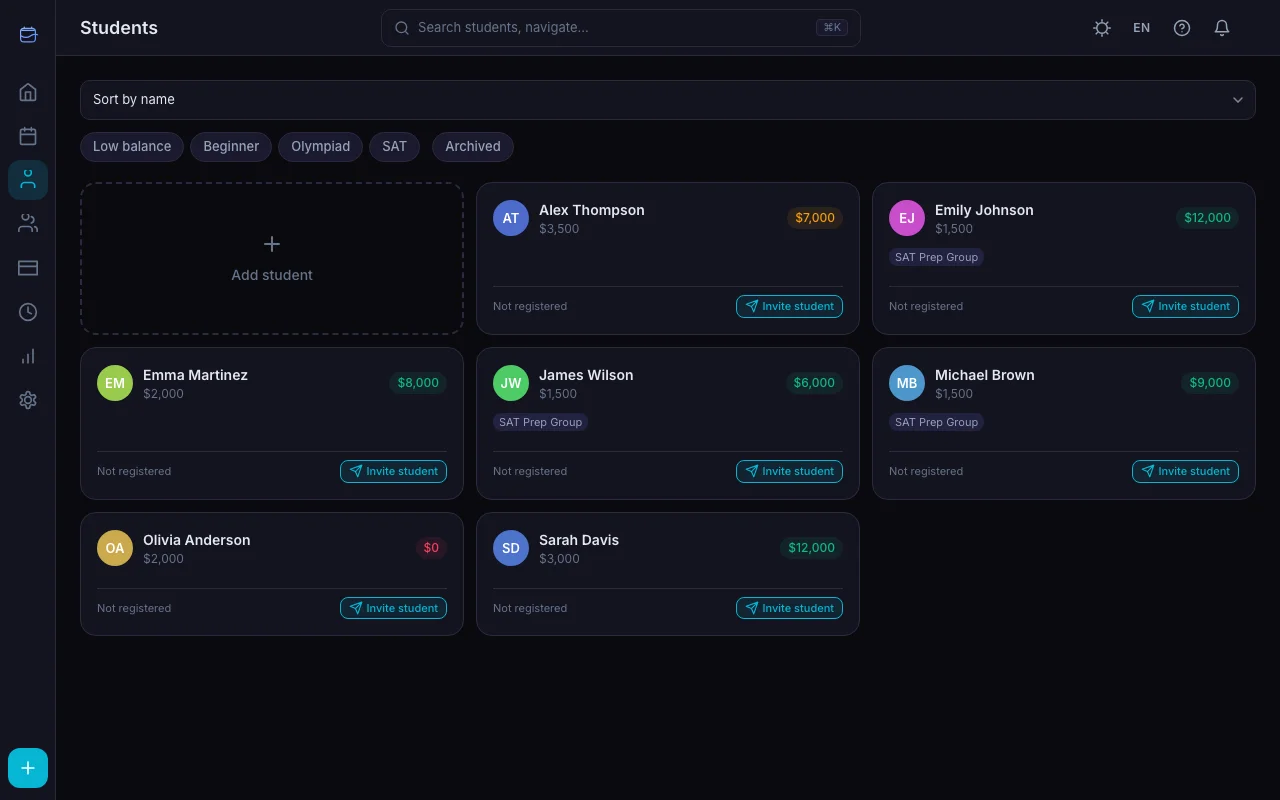
- Active vs. archived separation — past students don't clutter your view
- Quick search — find any student by name instantly
- Balance at a glance — see who has negative balance without clicking into each profile
- Schedule status — who has upcoming lessons
TeachersFlow's student list shows name, balance, and schedule status in one view. Negative balances are highlighted. Archive inactive students to keep the list clean.
System 6: Group Lessons
If your schedule is full but demand continues, group lessons let you serve more students in less time:
- 3 students × 1 hour = 3 hours of individual lessons
- 3 students in a group × 1 hour = 1 hour of teaching, 3 students served
Group scheduling in TeachersFlow works like individual — set a recurring slot, every member gets the lesson auto-generated. Billing is per student (each has their own balance).
The Math of Scale
| Metric | 10 Students | 30 Students | 30 Students + Systems |
|---|---|---|---|
| Weekly admin hours | 2–3 | 8–12 | 2–3 |
| Missed payments/month | 1–2 | 5–10 | 0–1 |
| Scheduling errors/month | 0–1 | 3–5 | 0–1 |
| Student messages/week | 10–15 | 30–50 | 5–10 |
The difference isn't about working harder — it's about having systems that scale.
Common Mistakes at Scale
Not archiving inactive students. Your active list should show only students you're currently teaching. Everyone else goes to the archive.
Using chat for scheduling. "Can we move Tuesday's lesson to Thursday?" via text message is fine for 5 students. At 30, it creates chaos. Use the scheduling tool — all changes are recorded and reflected in the calendar.
Forgetting to raise rates. More students means more demand for your time. If you're fully booked and have a waitlist, your price is too low — read How to Raise Your Tutoring Rates Without Losing Students.
Not setting boundaries. 30 students will fill every hour of every day if you let them. Block off personal time. Define working hours. Stick to them.
Avoiding groups. Many tutors resist groups because "individual attention is better." True for some subjects, but many students learn effectively in groups of 2–4. And the income difference is dramatic.
The Scaling Checklist
| System | Status |
|---|---|
| Recurring schedules for all regular students | ☐ |
| Auto-charge enabled with lesson prices set | ☐ |
| Student portal links shared with all students | ☐ |
| Lesson reminders configured | ☐ |
| Inactive students archived | ☐ |
| Group lessons created where applicable | ☐ |
| Working hours defined and blocked | ☐ |
| Rate reviewed for current demand | ☐ |
Scale Without Stress
TeachersFlow was built for exactly this moment — when your practice outgrows spreadsheets. Recurring schedules, auto-charge, student portal, notifications — all in one place.
14 days of full Pro access — no card required.