

You're a tutor, not an accountant. But somehow, half your evening goes to updating spreadsheets, checking who paid, replying to "when is my next lesson?" messages, and trying to remember which student missed last week.
A CRM fixes all of that. Here's why it matters and how to pick the right one.
What Is a Tutor CRM?
CRM stands for Customer Relationship Management. In the tutoring world, it means software that helps you manage:
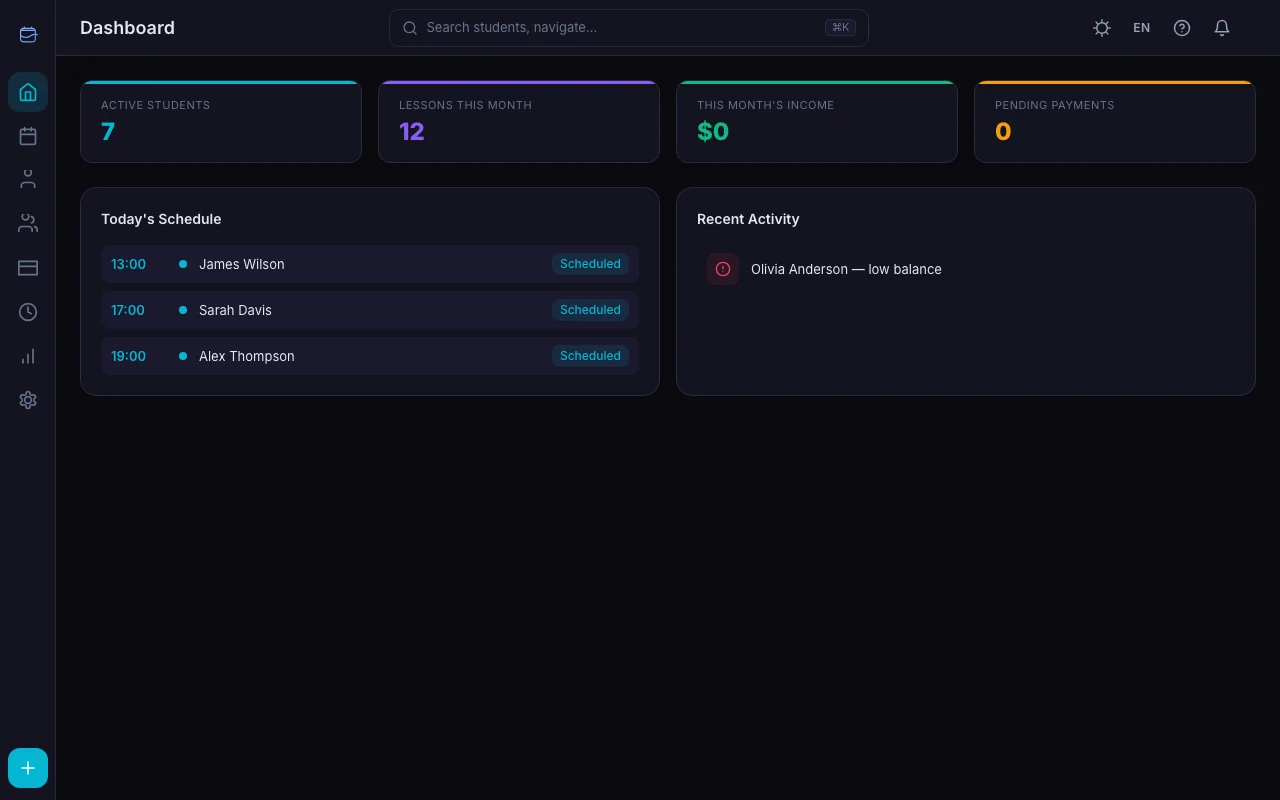
- Students — names, contacts, notes, lesson prices
- Schedule — recurring lessons, one-off sessions, cancellations
- Payments — who paid, who owes, balance tracking
- Analytics — how much you earn, how many lessons you teach, trends over time
Instead of juggling a calendar app, a spreadsheet, a messaging app, and your memory — everything lives in one place.
5 Signs You Need a CRM
1. You Have More Than 5 Students
At 1–3 students, you can keep everything in your head. At 5+, things start slipping. At 10+, you're guaranteed to forget something — a payment, a schedule change, a student's note about upcoming exams.
2. You Track Payments Manually
If you maintain a spreadsheet (or worse, a notebook) with columns for dates, amounts, and who owes what — you're doing CRM work by hand. Badly.
3. Students Ask You Questions You Should Know
"When is my next lesson?" "How much do I owe?" "Did I pay for last month?" If you need to look these up, your system is failing you. A CRM gives students their own portal with instant answers.
4. You've Double-Booked Yourself
It only takes one scheduling mistake to lose a student's trust. A CRM with conflict detection prevents this completely — see 5 Scheduling Mistakes Tutors Make for what else to watch for.
5. You Can't Answer "How Much Did I Earn Last Month?"
If calculating your monthly income takes more than 3 seconds, you need proper analytics. Running a business without knowing your numbers is flying blind. Revenue Analytics in TeachersFlow shows what real tutoring numbers look like.
What to Look for in a Tutor CRM
Not all CRMs are built for tutors. Here's what matters:
Student-Centric Design
A generic CRM calls everyone "contacts" or "leads." A tutor CRM should understand that students have lesson prices, balances, attendance history, and recurring schedules. Look for student profiles with these fields built in.
Calendar with Recurring Lessons
You need more than a calendar — you need one that understands weekly patterns. Set "Monday at 5 PM, 60 minutes" once, and every Monday should populate automatically. Bonus: drag-and-drop rescheduling.
Payment Tracking
The CRM should track: - How much each student owes - When they last paid - Automatic balance deduction after completed lessons - Payment history per student
If you need a separate spreadsheet for payments, the CRM isn't doing its job.
Student Portal
The best tutor CRMs give students a portal where they can check their schedule, see their balance, and confirm payments — without messaging you. This saves more time than any other feature.
Simple Pricing
Tutor CRM software should be affordable. You're not a Fortune 500 company. If it costs $30+/month or requires annual commitments, keep looking. The best options are $4–10/month with free tiers for small workloads.
Privacy and Data Security
Your students trust you with their data. The CRM should handle it responsibly — GDPR compliance, data export, account deletion. If it's unclear where your data goes, that's a red flag.
What TeachersFlow Offers
TeachersFlow was built specifically for private tutors. Not agencies, not schools, not generic businesses — tutors.
Here's what it includes:
- Student profiles with names, prices, notes, tags, and automatic balance tracking
- Weekly schedule editor — define slots once, lessons generate automatically; full mechanics in Recurring Lessons Setup
- Calendar with month and week views, drag-and-drop rescheduling, conflict detection
- Payment tracking with auto-charge (balance deducts after each lesson)
- Student portal — students see their schedule, balance, and submit payments
- Revenue analytics — income, lesson counts, cancellation rates, forecasts
- Group lessons — native support with per-student attendance
- Notifications — in-app and email reminders for lessons and payments
Pricing: Free plan for up to 5 students. Starter from $4/month (15 students). Pro $8/month (unlimited students, all features).
No admin overhead. No unnecessary complexity. Just what a tutor needs.
CRM vs Spreadsheet vs Nothing
| No System | Spreadsheet | Tutor CRM | |
|---|---|---|---|
| Time to check who owes you | 5–15 minutes | 2–5 minutes | Instant |
| Double booking risk | High | Medium | Zero (conflict detection) |
| Student self-service | None | None | Full (portal) |
| Monthly income report | Manual counting | Formulas (if built) | One click |
| Recurring schedule | Memory | Copy-paste calendar events | Automatic |
| Cost | Free | Free | Free–$8/month |
The jump from "nothing" to a CRM is dramatic. The jump from a spreadsheet to a CRM is still significant — mainly because of automation (auto-charge, auto-schedule, student portal).
Getting Started
If you have more than 5 students and track payments in any form, a CRM will pay for itself in the first week — just in saved time. Compare your current setup against TeachersFlow vs Excel and TeachersFlow vs Google Calendar before you decide.
Try TeachersFlow free for 14 days. Add your students, set their schedules, and see how much cleaner your week becomes — start with Get Started in 5 Minutes.
No card required.